What the role involves
The platform owner is a processor for every department, which is the controller of its own students' data (see privacy). Day to day there is nothing to do: departments administer themselves. The owner adds departments, keeps the server patched and backed up, holds the keys that are deliberately not in any backup, and produces new app builds.
Platform actions need a superadmin, a flag that only the command line sets (user promote <email> --superadmin). A superadmin who signs in to the portal lands on the Platform page; one who opens a department acts there as its owner, and every such support action is written to that department's audit log.
Adding a department
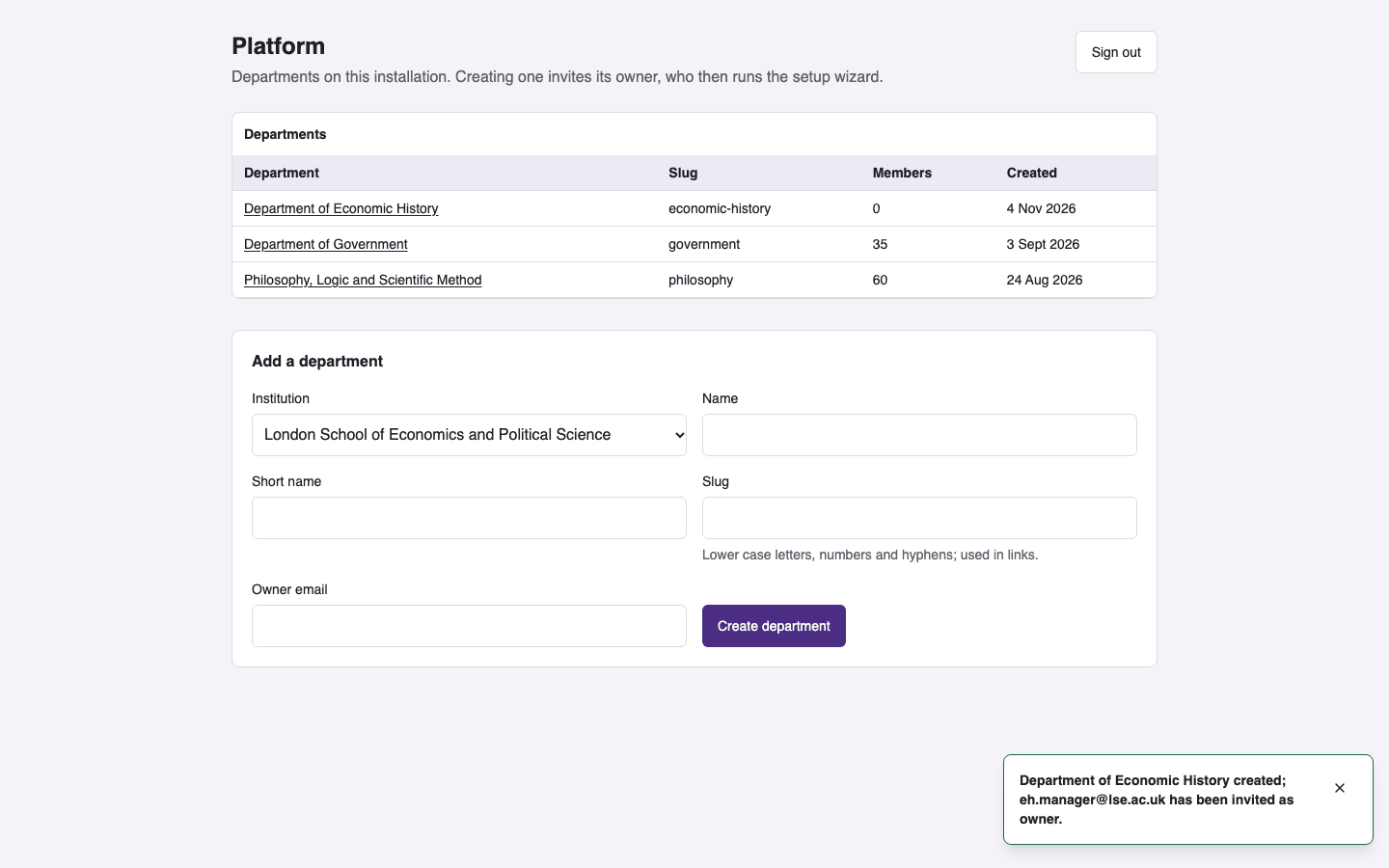
One command, or the form on the portal's Platform page. Both create the department with the recommended categories, its automatic channels and its own file-encryption key, and email an invitation to its owner. On the server the CLI runs inside the api container through infra/scripts/pigeonhole.sh; on a development machine it is pnpm pigeonhole.
infra/scripts/pigeonhole.sh tenant create --institution lse --slug government \
  --name "Department of Government" --short-name "Government" --owner j.doe@lse.ac.uk
The other platform commands, as the CLI lists them:
$ pnpm pigeonhole --help
Commands:
  tenant                       Departments (tenants)
  user                         Users
  roster                       Rosters
  whitelabel [options] <slug>  Write a department's white-label app assets and
                               config to apps/mobile/whitelabel/<slug>/
  keys                         Encryption keys

$ pnpm pigeonhole tenant list
economic-history     active          4  Department of Economic History
government           active         36  Department of Government
philosophy           active         62  Philosophy, Logic and Scientific Method
tenant list | suspend | resume | purge: see removing a department.user promote <email> [--superadmin] [--tenant <slug> --role <role>].user demo --tenant <slug>: the store reviewer's account, with a fixed sign-in code.user token <email>: a ten-minute token backed by a revocable session, for the white-label command.roster import <tenant> <csv> [--apply]: the same preview and apply as the portal.keys rewrap: used by key rotation, below.
Inviting an owner
tenant create invites the owner by email and prints the invitation link as well, in case the email is slow. Invitations last seven days and only work for the address they were sent to; signing in with that address accepts them automatically. From then on the department's owner invites everyone else (admins, academic staff) from People → Invitations, and imports the roster. An owner can make other owners; nobody can change their own role.
Students on the new department's roster who already use the app are told they have been added and find the department in their switcher. Nothing else is needed from the platform owner.
Deployment on the droplet
The launch deployment uses shared-host mode on the existing 2 GB droplet jmck-web (139.59.191.156, Ubuntu 24.04), next to the websites it already serves. The host's nginx keeps ports 80 and 443 and gets three virtual hosts, api., admin. and app.pigeonhole.jmckalex.org, which pass requests to the stack's own Caddy on 127.0.0.1:8080. The containers' memory limits add up to 1,200 MB (Postgres 384, api 320, worker 448, Caddy 48), with the host's 2 GB swap file behind them; Office-to-PDF conversion is off. A dedicated droplet (Caddy on 80 and 443 with automatic certificates) is the same stack with one compose file fewer.
Live since 4 November 2026. Version 0.1.0 was deployed that day: certificates from Let's Encrypt through certbot, and Mailgun's EU region for email, with the single domain pigeonhole.jmckalex.org used for both sending and receiving. On 5 November the database was reset to a clean state holding only the real department (Philosophy, Logic and Scientific Method, with its two owners), and nine more versions followed the same day. The screenshots on these pages come from a private copy with demonstration data, not from the live server.
So far the images are built on the owner's Mac for linux/amd64 (the server image without LibreOffice) and loaded onto the droplet over SSH, and the code is served to it from a bare repository on the droplet, /srv/pigeonhole.git. Since 5 November the code is also in a private GitHub repository, and pushes go to both. The Release workflow there builds both images on a v* tag and pushes them to ghcr.io/jmckalex/…; once the droplet's IMAGE_PREFIX points there, GitHub Actions becomes the image builder.
Releases
| Version | Date | What changed |
|---|---|---|
| v0.1.0 | 4 Nov | First deployment in shared-host mode; demonstration departments and the store reviewer's account. Universal-link files answered 404 until the Apple Team ID was set |
| – | 5 Nov | Database reset to the real department; Expo project and bundle identifier org.jmckalex.pigeonhole; first iOS preview build on EAS; APPLE_TEAM_ID, IOS_BUNDLE_ID and ANDROID_PACKAGE set, so /.well-known/apple-app-site-association is served (assetlinks.json waits for Android's signing fingerprints) |
| v0.1.1 | 5 Nov | Clickable titles aligned with their rows in portal tables and the app's event list; the first over-the-air update to the app |
| v0.1.2 | 5 Nov | Sign-in emails can be code only, per university, switched on for LSE. Before: Mailgun handed each email to Microsoft in 1–5 seconds, but Microsoft 365 held link-bearing email for 31–78 seconds of Safe Links scanning. After: requested at 14:33:56 UTC, in the inbox at 14:33:59 |
| v0.1.3 | 5 Nov | The API tells the portal and app what the email contains, and their "check your email" screens say so |
| v0.1.4 | 5 Nov | TeX maths in event titles and every Markdown body, drawn as MathJax SVG in the portal and the app |
| v0.1.5 | 5 Nov | A changed event refreshes Home's "Coming up"; the app refetches when it returns to the foreground; inline maths sits on the text's baseline on iOS |
| v0.1.6 | 5 Nov | App only: the iOS maths baseline calibrated to within a pixel |
| v0.1.7 | 5 Nov | App only: the reader's Close button as a filled pill, text reflowed into paragraphs, full-screen reading instead of page buttons |
| v0.1.8, v0.1.9 | 5 Nov | Players for YouTube, Vimeo, audio and video links; the sites' content security policy allows the two embed hosts and https: media |
Each release is a git tag, deployed with infra/scripts/deploy.sh --host deploy@jmck-web --no-pull v0.1.x while the images are loaded by hand (without --no-pull once they come from GHCR). App changes ship as Expo over-the-air updates on the preview channel, published with EXPO_PUBLIC_API_URL and EXPO_PUBLIC_ASSOCIATED_DOMAIN set in the shell and --environment preview. docs/STATUS.md §12 records every step.
First provisioning
provision.sh is idempotent and runs from your machine. It checks there is enough free memory, installs what is missing (fail2ban; Docker, Compose and restic are already there), creates the deploy user, clones the repository to /srv/pigeonhole, generates every secret into .env, sets up the data directory (an encrypted volume if one is attached), writes the nginx virtual hosts after backing up /etc/nginx (and restores the backup if nginx -t fails), obtains certificates with certbot once DNS resolves, installs the nightly backup timer, and waits for the Mailgun keys when EMAIL_DRIVER=mailgun.
# 1. provision in shared mode (until DNS resolves, without certificates)
infra/scripts/provision.sh --mode shared --domain pigeonhole.jmckalex.org \
  --image-prefix ghcr.io/<owner> --repo git@github.com:<owner>/<repo>.git --skip-certs jmck-web
# 2. fill in /srv/pigeonhole/.env on the server (Mailgun, Spaces and restic, OPS_DIGEST_TO), then
infra/scripts/provision.sh jmck-web          # obtains the three certificates once DNS resolves
# 3. tag, get the images onto the droplet (GHCR, or built locally and loaded over SSH), deploy
infra/scripts/deploy.sh --host deploy@139.59.191.156 --snapshot v0.1.0
deploy.sh refuses a .env with development settings, takes a Digital Ocean snapshot if asked, checks out the tag, pulls the images (unless --no-pull), runs migrations as a one-shot container, then restarts the worker, the api (Caddy holds incoming requests for up to 30 seconds meanwhile) and Caddy, waiting for each health check, and finally checks https://api.…/readyz and the portal. Each deployed tag is appended to /srv/pigeonhole/.deploy-history.
Copy the finished .env to your password manager. Three of its values are deliberately in no backup: STORAGE_MASTER_KEY, TENANT_KEY_ENCRYPTION_KEY and RESTIC_PASSWORD. Losing them loses the files, the sealed authors of anonymous questions, and the backups.
The encrypted data volume
Since 5 November the database and the uploads live on a 10 GB DigitalOcean block volume, pigeonhole-data, encrypted with LUKS2 (aes-xts-plain64, argon2id) and mounted at /srv/pigeonhole/data. Its passphrase was generated on the owner's Mac and is kept only in the owner's password manager; it is never stored on the droplet. The move took the stack down for about a minute, and every file was compared after copying.
The consequence: after any reboot the stack stays down until someone unlocks the volume with infra/scripts/unlock.sh root@jmck-web, which asks for the passphrase, mounts the volume and starts the stack. The host's automatic reboots after kernel updates are therefore switched off (/etc/apt/apt.conf.d/52unattended-upgrades-local); security updates still install, and when the SSH login banner says "System restart required" the owner reboots at a quiet time and runs unlock.sh straight after.
Backups and restore
A systemd timer on the host runs infra/scripts/backup.sh every night at 03:00 London time: one encrypted restic snapshot of a pg_dump of the database and of the uploads directory. Thirty daily and twelve monthly snapshots are kept. The script writes its result to status.json, which the weekly ops digest reports on.
Open item: the snapshots are meant to go to a Digital Ocean Spaces bucket, but no bucket exists yet, so on the live server the restic repository is local, under /srv/pigeonhole/backup/restic. Until a bucket is created and RESTIC_REPOSITORY and the AWS_* keys in .env point at it, a backup does not leave the droplet and would not survive losing it.
systemctl list-timers pigeonhole-backup.timer     # when it runs next
journalctl -u pigeonhole-backup                   # what happened
sudo infra/scripts/restore.sh --list              # snapshots
sudo infra/scripts/restore.sh latest              # stop, replace database and uploads, start
On a fresh droplet: provision.sh, put the .env back from the password manager (the same storage, tenant and restic keys), deploy.sh <tag> once so the images and an empty database exist, then restore.sh latest. Recovery should take under an hour.
The restore drill runs in GitHub Actions on the first of every month and on every push that changes the infrastructure: a throwaway Ubuntu container is provisioned in shared mode, deployed, seeded, backed up, wiped and restored, and the row counts, the wrapped department keys and a hash of every uploaded file must match. It has run on GitHub since the repository moved there on 5 November.
Keys and encryption
Every uploaded file is encrypted with AES-256-GCM under its department's own data key; each data key is stored wrapped by STORAGE_MASTER_KEY, which exists only in the server's .env. Files are therefore encrypted on disk, in backups and on object storage. On the live server Postgres and the uploads also sit on a LUKS2-encrypted volume whose passphrase is never stored on the droplet (above): after a reboot, infra/scripts/unlock.sh asks for it and starts the stack. So the database is encrypted at rest as well. A new deployment can attach the volume at provisioning, or add it later with the documented move used here.
infra/scripts/rotate-keys.sh rotates a key, saving .env first:
| Key | Rotation | Effect |
|---|---|---|
FILE_SIGNING_KEY | rotate-keys.sh file-signing | Signed file links already issued stop working; the apps fetch new ones (they last minutes) |
JWT_SIGNING_KEY | rotate-keys.sh jwt | 15-minute access tokens become invalid; apps refresh silently, nobody is signed out; calendar-feed links change |
STORAGE_MASTER_KEY | rotate-keys.sh storage-master | Stops the api and worker, re-wraps every department key in one verified transaction, restarts; files are not re-encrypted |
TENANT_KEY_ENCRYPTION_KEY | Not rotatable | It seals the authors of anonymous questions; a new key would make them impossible to reveal |
RESTIC_PASSWORD | restic key add / remove | restic keeps several keys per repository |
POSTGRES_PASSWORD | By hand | ALTER USER, update .env, restart |
Encryption at rest protects data that is not in use. An attacker with root on the running server can read what the application reads; the defences against that are the hardening (SSH keys only, firewall, fail2ban, automatic security updates, no database port exposed), holding little data, and hashing every secret token. The threat model is infra/SECURITY.md; the Phase 3 security review, merged on 4 November, is docs/SECURITY-REVIEW.md.
Monitoring and the ops digest
- Uptime: point any free checker (or Digital Ocean Monitoring) at
https://api.pigeonhole.jmckalex.org/readyz, which checks the database and storage. After a reboot with an encrypted volume, this is the alert that says to rununlock.sh. - Alerts from Digital Ocean on disk over 80%, CPU over 80% for ten minutes and, in shared mode, memory over 90%.
- The weekly ops digest, Mondays at 07:00, emailed to
OPS_DIGEST_TO: disk use of the data volume and of Docker (warning at 80%); the last backup (warning when it is more than 36 hours old or the last attempt failed); failed background jobs per queue; email bounces and spam complaints; push-notification errors; and membership requests waiting in each department. Nothing is sent whenOPS_DIGEST_TOis empty. - Logs:
infra/scripts/compose.sh logs -f --tail=200 api worker, JSON lines with request and department ids but never bodies or tokens; rotated at 50 MB × 5 per container. - Errors: optional Sentry for all four apps through
SENTRY_DSN.
Upgrading
A release is a git tag. Pushing v0.2.0 to GitHub builds and publishes both images to GHCR; infra/scripts/deploy.sh --host deploy@<ip> v0.2.0 deploys it with migrations first. (Until the droplet pulls from GHCR, the images are built locally, loaded over SSH and deployed with --no-pull, as for v0.1.0 to v0.1.9.) Migrations only ever add, so the previous tag runs on the newer schema and rollback is deploy.sh with the previous tag. Take --snapshot before anything unusual.
App changes that are JavaScript only reach phones as over-the-air updates with no store review: eas update --channel preview --environment preview for the TestFlight build now, the production channel once the app is in the stores. An update reaches only builds with the same runtime version (the app version, 1.0.0 today). Native changes need a new build and store submission.
Growing: resizing the droplet to 4 GB (CPU and memory only, so reversible; about $12 a month more) allows Office-to-PDF conversion (LIBREOFFICE_ENABLED=true) and the dedicated-mode memory limits. A dedicated droplet later is provision.sh --mode dedicated, the same .env, deploy.sh, restore.sh latest, then moving DNS.
White-label builds
A department that wants its own store listing ("LSE Government") gets a build of the same app with its name, icon, colours, URL scheme and bundle identifiers, which skips the department switcher and talks to the same server. The whitelabel command fetches the department's branding and writes everything the build needs into apps/mobile/whitelabel/<slug>/: the app configuration, a 1024-pixel icon (the department's uploaded icon or, without one, a monogram on its accent colour), Android adaptive and monochrome icons, light and dark splash images, and EAS build profiles.
# on the server: a ten-minute superadmin token
infra/scripts/pigeonhole.sh user token platform.admin@lse.ac.uk
# on your machine
PIGEONHOLE_TOKEN=<token> pnpm pigeonhole whitelabel government --api-url https://api.pigeonhole.jmckalex.org
cd apps/mobile && eas build --profile government-preview --platform all
For Government this gives the name "Government", the scheme lse-government:// and the identifiers org.pigeonhole.lse.government. Add the new bundle id and package to IOS_BUNDLE_ID and ANDROID_PACKAGE on the server so that the app's universal links open it too.


The icons, splash screens, build profiles and the generated whitelabel/government folder are Phase 3 work (agent P1), merged into main on 4 November; the government folder must be generated again against the live API before its first build. One detail to know: EAS evaluates the app configuration again on its build server, so the department must be named in the build profile (as the generated government-* profiles do), not in a shell variable.
Store submission, in outline
Everything that needs no Apple, Google or Expo login was prepared in Phase 3 and merged on 4 November: release configuration, icons and splash screens, the privacy manifest, the App Store and Play listing text, privacy-label and Data-safety answers, reviewer notes and screenshots, and the privacy and support pages served by the app's web host. Where things stand:
- Done, 5 November: the Expo project and the bundle identifier and Android package
org.jmckalex.pigeonhole; the Apple Team ID on the server, so the universal-link file is served; the first iOSpreviewbuild on EAS. Build 2 (runtime 1.0.0) is on TestFlight, and the owner has installed it and signed in. Every app change since has gone out as an over-the-air update on thepreviewchannel. - Android: not built yet. It needs the Firebase configuration and FCM key for push, a
previewbuild for Play internal testing (the first upload is manual), and the signing fingerprint inANDROID_SHA256_FINGERPRINTSso thatassetlinks.jsonis served. - The listings: not submitted. They need the public name (the "Pigeonhole" codename collides with an unrelated product), the screenshots, the privacy answers, the reviewer account from
user demowith its fixed code, and the contact address for abuse reports. Apple's rules for user-generated content (reporting, blocking, a moderation queue, in-app account deletion) are already met. - Release:
productionprofile builds, then over-the-air updates on theproductionchannel for JavaScript-only fixes.
The step-by-step list is docs/STORE-SUBMISSION.md, and infra/STORE-CHECKLIST.md is ticked with evidence. Native builds need Xcode 26.4 or later; the owner's Mac has 16.4, so builds run on EAS's servers.
Removing a department
tenant suspend <slug> makes a department read-only and hides it from switchers (tenant resume undoes it). After the retention period (30 days from suspension by default), tenant purge <slug> --confirm <slug> first writes an archive (one JSON-lines file per table, the member users, and every stored file decrypted) and records its checksum in the platform audit log, then deletes the department, which removes every row it owns and destroys its file key, so any stray encrypted copy can no longer be read. The archive holds personal data: move it somewhere encrypted and delete it when it is no longer needed.
Costs
| Item | Per month |
|---|---|
| Shared mode on the existing 2 GB droplet | $0 extra |
| Resizing it to 4 GB, if needed | about $12 |
| Dedicated droplet, 2 vCPU / 4 GB | about $24 |
| Spaces bucket for backups | about $5 |
| Block storage volume for the encrypted data (10 GB on the live server) | about $1 |
| Email provider, about 10,000 emails | about $15 |
| Expo EAS (free tier covers a few builds) | $0–19 |
| Apple Developer Program | $99 a year |
| Google Play | $25 once |
About £20–35 a month in shared mode, or £40–55 on a dedicated droplet, for any number of departments at LSE scale. The email provider on the live server is Mailgun, in its EU region, for both sending and receiving; Postmark and plain SMTP remain supported, with the same email-in rules and the same bounce handling.